


Display & Video 360 (DV360) is Google’s demand-side platform (DSP) for programmatic advertising.
It provides access to premium inventory across display, video, audio, connected TV, and digital out-of-home—giving advertisers unprecedented reach and control over their programmatic campaigns.
Unlike Google Ads Display Network, which limits you to Google’s owned inventory, DV360 connects to 80+ ad exchanges, enabling you to reach virtually any audience across the open web. This guide covers everything from campaign setup to advanced optimisation strategies.
In this guide:
- What Is Display & Video 360? — Core capabilities and use cases
- What Inventory Can You Access Through DV360? — Display, video, CTV, audio, DOOH
- How Is DV360 Structured? — Account hierarchy and components
- How Do You Set Up a DV360 Campaign? — Step-by-step campaign creation
- What Audience Targeting Options Are Available? — First-party, Google, third-party data
- What Bidding Strategies Should You Use? — CPM, CPC, CPA, and automation
- How Do You Ensure Brand Safety? — Verification and viewability
- How Does DV360 Integrate with Other GMP Products? — CM360, GA360, SA360 connections
What Is Display & Video 360?
Display & Video 360 is Google’s enterprise demand-side platform that enables programmatic media buying across multiple ad exchanges and inventory sources. It’s one of the four core products in the Google Marketing Platform suite.
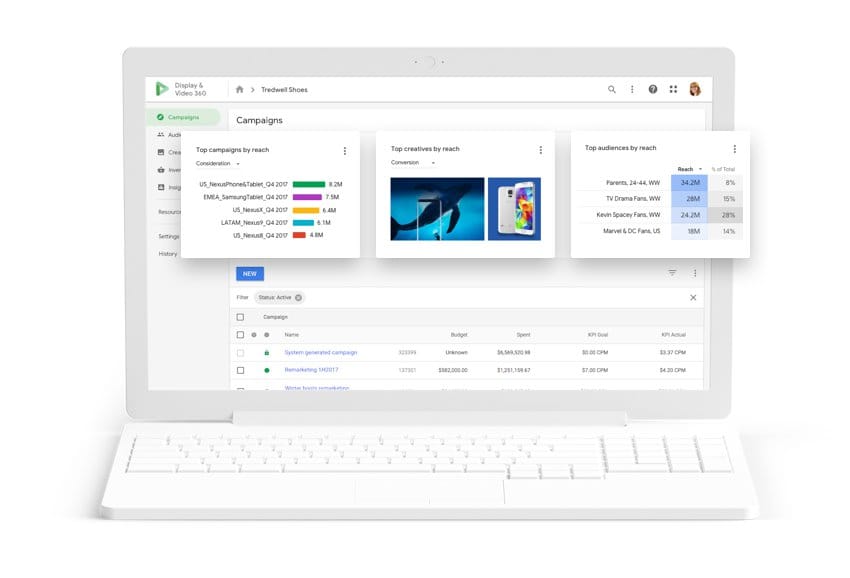
DV360 provides three core capabilities:
1. Media Buying
Purchase advertising inventory programmatically across:
- Open Exchange: Real-time bidding on 80+ exchanges
- Private Marketplaces (PMP): Invitation-only deals with publishers
- Programmatic Guaranteed (PG): Reserved inventory at fixed prices
- Direct Deals: Publisher relationships managed in platform
2. Audience Management
Target users based on:
- First-party data (your CRM, website visitors)
- Google data (demographics, interests, intent)
- Third-party data providers
- Custom combinations and lookalikes
3. Creative Management
Deploy and optimise creative:
- Dynamic creative optimisation (DCO)
- Native advertising formats
- Rich media (HTML5)
- Video (in-stream, out-stream)
- Audio for streaming platforms
What Inventory Can You Access Through DV360?
DV360’s primary advantage over Google Ads is inventory access. Here’s what’s available.
Display Inventory
| Source | Description | Access Method |
|---|---|---|
| Google Display Network | Google’s owned inventory | Open exchange |
| Premium publishers | News, entertainment sites | PMP/PG deals |
| Open exchanges | AppNexus, Rubicon, Index, etc. | RTB |
| Native inventory | In-feed, content recommendation | Exchange/PMP |
Video Inventory
| Source | Description | Access Method |
|---|---|---|
| YouTube | Pre-roll, mid-roll, bumper | Open/reserved |
| YouTube Select | Premium YouTube channels | PG deals |
| Streaming services | Catch-up TV, BVOD | PMP/PG |
| Publisher video | In-article video players | RTB/PMP |
| VAST/VPAID | Standard video ad serving | All |
Connected TV (CTV) & Over-the-Top (OTT)
| Source | Description | Access Method |
|---|---|---|
| YouTube CTV | YouTube on smart TVs | Open/reserved |
| Streaming apps | Pluto, Tubi, etc. | PMP |
| BVOD | 7+, 9Now, 10 Play (AU) | PMP/PG |
| Smart TV platforms | Samsung, LG native | Exchange |
Audio
| Source | Description | Access Method |
|---|---|---|
| Spotify | Streaming music ads | Open Exchange/PMP |
| Podcasts | Pre/mid-roll audio | Exchange/PMP |
| Digital radio | iHeart, Pandora | PMP |
Digital Out-of-Home (DOOH)
| Source | Description | Access Method |
|---|---|---|
| Billboards | Digital highway signage | SSP integration |
| Transit | Bus stops, train stations | PMP |
| Retail | In-store screens | PMP |
How Is DV360 Structured?
Understanding DV360’s hierarchy is essential for effective campaign management.
Account Structure
DV360 uses a hierarchical structure that mirrors how programmatic media buying is typically organised.
At the top sits the Partner (usually an agency), which contains Advertisers (brands).
Each Advertiser runs Campaigns containing Insertion Orders (budget containers), which hold Line Items (your targeting and bidding settings) with associated Creatives:
Partner (Agency/Holding Company)
    │
    └── Advertiser (Client/Brand)
            │
            ├── Campaign (Marketing Objective)
            │       │
            │       ├── Insertion Order (Budget/Flight)
            │       │       │
            │       │       ├── Line Item (Targeting + Bidding)
            │       │       │       │
            │       │       │       └── Creative (Ad Units)
            │       │       │
            │       │       └── Line Item 2...
            │       │
            │       └── Insertion Order 2...
            │
            └── Campaign 2...
Component Definitions
| Level | Purpose | Key Settings |
|---|---|---|
| Partner | Agency or company account | User permissions, billing |
| Advertiser | Individual brand/client | Tracking, audiences, creatives |
| Campaign | Marketing objective | Goal, KPIs, frequency caps |
| Insertion Order | Budget container | Budget, dates, pacing |
| Line Item | Targeting + bidding | Audience, inventory, bids |
| Creative | Ad units | Formats, messaging, assets |
Best Practice Structure Example
For a brand awareness campaign:
Campaign: Q1 2026 Brand Awareness
├── IO: Display ($50,000)
│   ├── LI: Display - In-Market Audiences
│   └── LI: Display - Custom Intent
│
└── IO: Video ($50,000)
    ├── LI: Video - YouTube TrueView
    └── LI: Video - Premium Publishers
How Do You Set Up a DV360 Campaign?
Here’s the step-by-step process for launching a campaign in DV360.
Step 1: Create Campaign
- Navigate to Advertiser > Campaigns > New Campaign
- Configure campaign settings:
| Setting | Recommendation |
|---|---|
| Name | Clear naming: [Brand][Objective][Quarter] |
| Goal | Match to business objective (awareness, consideration, action) |
| Frequency Cap | 3-5 impressions/user/day typical |
| Brand Safety | Prevent ads appearing alongside inappropriate content. |
Step 2: Create Insertion Order
- Within campaign, create new Insertion Order
- Configure IO settings:
| Setting | Recommendation |
|---|---|
| Name | [Month][Tactic][Budget] |
| Budget | Budget flights |
| Pacing | Ahead (recommended) or ASAP |
| Dates | Start and end dates |
| Performance goal | CPM, CPC, CPA, or ROAS |
Step 3: Create Line Items
Line items are where targeting and bidding happen:
Inventory Source Selection:
- Public inventory (open exchange)
- Deals (PMP, PG)
- YouTube & partners
- By exchange
Targeting Configuration:
- Geography: Countries, regions, cities, radius
- Device: Desktop, mobile, tablet, CTV
- Environment: Web, app, CTV
- Time: Day parting, timezone
- Audience: First-party, Google, third-party
- Context: Keywords, categories, placements
Bidding Setup:
- Bid strategy (CPM, vCPM, CPC, CPA)
- Maximum bid
- Automated bid optimisation
Step 4: Assign Creatives
- Upload or create creatives (our recommendation is to use Campaign Manager 360, then assign the creatives to DV360 from there):
- Display: Image, HTML5, native
- Video: VAST compliant
- Audio: MP3/supported formats
- Associate creatives with line items
- Configure rotation settings
Step 5: Launch and Monitor
- Review all settings
- Submit for approval (if required)
- Activate line items
- Monitor pacing and performance
What Audience Targeting Options Are Available?
DV360’s audience capabilities are extensive. Here’s how to use them effectively.
First-Party Data
Your own data, uploaded or integrated:
| Source | Integration Method |
|---|---|
| CRM lists | Customer Match upload |
| Website visitors | Floodlight/GA360 audiences |
| App users | Firebase/SDK integration |
| Offline conversions | Secure data transfer |
Best uses:
- Retargeting website visitors
- CRM reactivation campaigns
- Customer exclusion (suppress existing customers)
- Lookalike seed audiences
Google Audiences
Google’s pre-built audience segments:
| Type | Description | Example |
|---|---|---|
| Affinity | Long-term interests | “Technology Enthusiasts” |
| In-Market | Active purchase intent | “Business Software” |
| Demographics | Age, gender, income | “25-34, HHI $100K+” |
| Life Events | Major milestones | “Recently Started Business” |
| Custom Intent | Based on search behaviour | Created from keywords |
Third-Party Data
External data providers available in DV360:
| Provider | Specialty |
|---|---|
| Oracle Data Cloud | Demographics, purchase |
| Experian | Financial, demographics |
| Nielsen | Media behaviour |
| IRI | Purchase behaviour |
| Lotame | Interest segments |
Note: Third-party data has an additional cost (CPM increment) and availability varies by region.
Audience Strategies
Prospecting (finding new customers):
- Start with Google In-Market + Affinity
- Layer with Custom Intent (search-based)
- Exclude converters and existing customers
- Create lookalikes from best customers
Retargeting (re-engaging visitors):
- Segment by site behaviour (viewed product, abandoned cart)
- Use recency for bid adjustments (recent visitors = higher bids)
- Sequence messaging based on funnel stage
- Frequency cap to avoid ad fatigue
Suppression (excluding audiences):
- Exclude recent converters
- Exclude current customers
- Exclude job applicants (if recruiting)
- Exclude inappropriate contexts
What Bidding Strategies Should You Use?
DV360 offers multiple bidding strategies. Choose based on your objectives.
Bidding Strategy Overview
| Strategy | Optimises For | Best When |
|---|---|---|
| CPM | Impressions | Brand awareness, reach |
| vCPM | Viewable impressions | Viewability matters |
| CPC | Clicks | Traffic/consideration |
| CPA | Conversions | Direct response |
| Maximise conversions | Most conversions | Volume > efficiency |
| Custom bidding | Your algorithm | Advanced needs |
Automated Bidding Best Practices
DV360’s automated bidding uses machine learning. To get best results:
1. Sufficient Data:
- Minimum 15-20 conversions/week per line item
- Ideally 50+ conversions/week
- Consider micro-conversions if main conversions are sparse
2. Conversion Window:
- Set appropriate lookback window (7-30 days)
- Match to actual purchase consideration time
- Include view-through if relevant
3. Learning Period:
- Allow 1-2 weeks for algorithms to learn
- Avoid major changes during learning
- Expect efficiency to improve over time
4. Budget Sufficiency:
- Enough budget to achieve target volume
- Underfunded campaigns won’t optimise effectively
Manual vs Automated
| Scenario | Recommendation |
|---|---|
| New campaign, no data | Start manual, switch to automated |
| Established, high volume | Automated bidding |
| Low conversion volume | Manual or micro-conversion optimisation |
| Brand awareness | CPM or vCPM (manual or automated) |
| Direct response | CPA automated |
How Do You Ensure Brand Safety?
Brand safety controls prevent ads appearing alongside inappropriate content.
Pre-Bid Solutions
Apply before bidding on impressions:
| Control | Description |
|---|---|
| Content labels | Exclude sensitive categories (DL-MA, etc.) |
| Digital content labels | Google’s content classification |
| Sensitive categories | Tragedy, conflict, adult, etc. |
| Keyword blocking | Block pages containing specific terms |
| Site blocking | Block specific domains and apps |
Third-Party Verification
Integrate verification partners:
| Partner | Capabilities |
|---|---|
| DoubleVerify | Viewability, brand safety, fraud |
| IAS | Viewability, brand safety, fraud |
| MOAT | Viewability, attention metrics |
Setup:
- Contract with verification partner
- Add verification tags in CM360 or DV360
- Configure blocking rules
- Monitor in reporting
Viewability Standards
| Metric | Definition |
|---|---|
| Display viewable | 50% of pixels visible for 1+ second |
| Video viewable | 50% of pixels visible for 2+ seconds |
| Custom viewability | Your defined threshold |
Targeting for viewability:
- Use vCPM bidding
- Set viewability floors (e.g., only bid on 70%+ viewable inventory)
- Layer verification partner targeting
How Does DV360 Integrate with Other GMP Products?
DV360’s value increases significantly when integrated with the broader GMP suite.
DV360 + Campaign Manager 360
| Integration | Benefit |
|---|---|
| Ad serving | Serve DV360 creatives through CM360 |
| Floodlight | Use CM360 conversions for DV360 bidding |
| Attribution | CM360 attribution across all media |
| Frequency | Unified frequency management |
| Reporting | Combined reporting across channels |
DV360 + Google Analytics 360
| Integration | Benefit |
|---|---|
| Audience export | GA360 audiences → DV360 targeting |
| Site data | GA360 behaviour informs bidding |
| Conversion import | GA360 conversions for optimisation |
| Campaign data | DV360 data in GA360 reports |
DV360 + Search Ads 360
| Integration | Benefit |
|---|---|
| Cross-channel | Coordinate search + display |
| Audience sharing | Search remarketing lists in DV360 |
| Attribution | Unified view via CM360 |
| Sequential messaging | Search → display journeys |
For complete GMP integration details, see our Google Marketing Platform Guide.
What Reports Should You Monitor?
Effective DV360 management requires monitoring the right metrics.
Key Performance Metrics
| Metric | Definition | Target Benchmark |
|---|---|---|
| Impressions | Ad served count | Volume goal |
| Viewable impressions | MRC viewable | 70%+ viewability |
| Clicks | User clicks | Context-dependent |
| CTR | Clicks / impressions | Display: 0.1-0.3%, Video: 0.5-2% |
| VCR | Video completion rate | 60-80% |
| Conversions | Actions completed | Campaign goal |
| CPA | Cost per conversion | Below target |
| ROAS | Revenue / ad spend | Above 1.0 |
Essential Reports
1. Pacing Report
- Track budget spend vs target
- Identify under/over-pacing line items
- Adjust bids or budgets accordingly
2. Performance by Audience
- Identify top-performing segments
- Shift budget to winners
- Pause underperformers
3. Creative Performance
- Compare creative variants
- Identify fatigue (declining CTR)
- Rotate fresh creative
4. Inventory Analysis
- Performance by exchange
- Site-level reporting
- Identify high/low quality inventory
5. Viewability Report
- Viewability by inventory source
- Action on low-viewability placements
- Optimise for viewable impressions
Reporting Frequency
| Report | Frequency | Action |
|---|---|---|
| Pacing | Daily | Budget adjustments |
| Performance | Weekly | Optimisation decisions |
| Audience | Weekly | Targeting refinements |
| Creative | Bi-weekly | Creative rotation |
| Full analysis | Monthly | Strategy review |
Frequently Asked Questions
What’s the difference between DV360 and Google Ads Display?
DV360 is an enterprise demand-side platform with access to 80+ ad exchanges, while Google Ads Display only accesses Google Display Network inventory. DV360 offers advanced features like private marketplace deals, programmatic guaranteed, cross-exchange frequency management, and deeper data access. However, DV360 requires significant minimum spend (typically $200K+/year) and has platform fees on top of media costs.
How much does DV360 cost?
DV360 pricing is typically a percentage of media spend, usually 10-15% depending on volume and contract terms. This is in addition to your media costs. For a $1M annual programmatic budget, expect $100-150K in platform fees. There’s also typically a minimum spend requirement. Access is usually through a GMP partner rather than direct with Google.
Can I buy YouTube ads through DV360?
Yes, DV360 can access YouTube inventory, including standard YouTube placements and YouTube Select (premium channels). DV360 offers more sophisticated audience targeting, frequency management, and reporting for YouTube campaigns compared to Google Ads. However, some YouTube features (like TrueView for Action) may perform differently across platforms.
What’s the difference between open exchange, PMP, and programmatic guaranteed?
Open exchange is real-time bidding on publicly available inventory—anyone can bid. Private Marketplace (PMP) is invitation-only deals where publishers offer premium inventory to select buyers at negotiated floor prices. Programmatic Guaranteed (PG) is reserved inventory at fixed prices with guaranteed delivery—essentially a traditional IO executed programmatically.
How do I get access to DV360?
DV360 is accessed through Google Marketing Platform partners (resellers) or, for large advertisers, directly with Google. Most organisations work with a GMP partner who provides platform access, implementation support, and often managed services. Partners can aggregate spend for better pricing than going direct.
Can DV360 target people who searched for specific terms on Google?
Yes, through Custom Intent audiences. You provide keywords, and DV360 targets users who have recently searched for those terms on Google. This brings search intent into display and video campaigns. Note: This is audience targeting (people who searched), not contextual (pages about topics).
Next Steps
Display & Video 360 provides powerful programmatic capabilities for organisations with significant media budgets. Its inventory access, audience features, and GMP integration make it the platform of choice for enterprise programmatic advertising.
Key actions:
- Assess your fit: Is your programmatic spend sufficient to justify DV360?
- Evaluate partners: Work with a certified GMP partner for access and support
- Plan integration: Consider CM360 and GA360 for full GMP benefit
- Start with structure: Build a scalable campaign architecture from day one
Ready to explore DV360?
XPON is a certified Google Marketing Platform partner with deep DV360 expertise. We help organisations:
- Assess DV360 fit and plan implementation
- Build effective campaign structures
- Develop audience strategies
- Integrate with CM360 and GA360
- Provide ongoing optimisation and managed services
Talk to our programmatic team to discuss your DV360 needs.

Last updated: January 2026