

Search Ads 360 (SA360) is Google’s enterprise search campaign management platform that enables centralised control of search advertising across multiple engines – including Google Ads, Microsoft Advertising, Yahoo Japan, and Baidu—from a single interface.
For organisations managing significant search spend across multiple markets or engines, SA360 provides the scale, automation, and integration capabilities that native platforms lack.
This guide covers SA360’s capabilities, from multi-engine campaign management to advanced portfolio bidding and Floodlight integration with Campaign Manager 360.
In this guide:
- What Is Search Ads 360? — Core capabilities and engines supported
- How Does SA360 Differ from Native Platforms? — Feature comparison and value
- How Is SA360 Structured? — Account hierarchy and sync model
- How Do You Set Up SA360? — Linking accounts and configuration
- What Bidding Capabilities Does SA360 Offer? — Portfolio strategies and cross-engine optimisation
- How Do You Manage Multiple Engines in SA360? — Multi-engine campaign management
- How Does SA360 Integrate with Campaign Manager 360? — Floodlight and attribution
- What Bulk Management Features Does SA360 Offer? — Bulksheets, templates, feeds
What Is Search Ads 360?
Search Ads 360 is a search management platform that sits on top of individual search engine advertising accounts (Google Ads, Microsoft Advertising, etc.), providing unified management, bidding, and reporting. It’s part of the Google Marketing Platform enterprise suite.
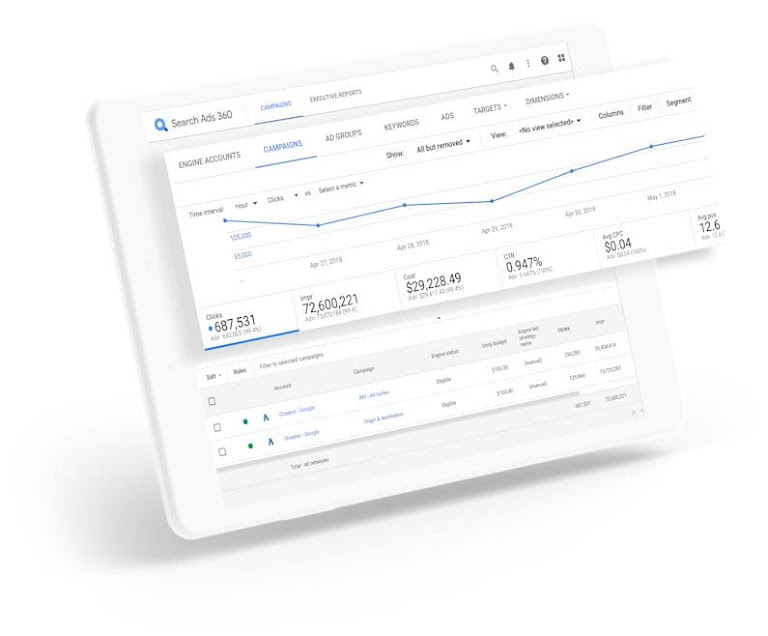
SA360 provides four core capabilities:
1. Multi-Engine Management
Manage campaigns across multiple search engines from one interface:
- Google Ads
- Microsoft Advertising (Bing)
- Yahoo Japan
- Baidu
- Yahoo Gemini
2. Advanced Bidding
Portfolio bid strategies that optimise across accounts:
- Cross-engine bid optimisation
- Custom Floodlight-based bidding
- Auction-time bidding with advanced Floodlight signals, plus intraday portfolio updates
- Budget pacing and management
3. Unified Reporting
Consolidated view of all search activity:
- Cross-engine reporting
- Custom attribution models
- Executive dashboards
- Data exports
4. Workflow Automation
Enterprise-scale campaign management:
- Bulk editing across accounts
- Campaign templates
- Inventory feed integration
- Rules and alerts
How Does SA360 Differ from Native Platforms?
Understanding SA360’s value requires comparing it to managing campaigns directly in Google Ads or Microsoft Advertising.
Feature Comparison
| Capability | Native Platforms | SA360 |
| Engines | One platform only | Google, Bing, Yahoo, Baidu |
| Campaign view | Single account | All accounts, all engines |
| Bidding scope | Per-account | Portfolio across accounts |
| Bid updates | Daily (Smart Bidding) | Auction-time + intraday |
| Attribution | Platform-native | SA360 and CM360 cross-channel |
| Reporting | Platform-specific | Unified, cross-engine |
| Bulk operations | Limited | Advanced (templates, feeds) |
| Data access | API only | UI + exports + API |
| Cost | Free | % of media spend |
When SA360 Adds Value
✓ Multi-engine search programmes
Managing campaigns across Google Ads AND Microsoft Advertising (or other engines) benefits significantly from SA360’s unified interface and cross-engine optimisation.
✓ Large-scale operations
Organisations managing hundreds of campaigns, millions of keywords, or multiple markets gain efficiency from SA360’s bulk tools and templates.
✓ Advanced attribution needs
When you need cross-channel attribution (search + display + other media) via CM360 integration, SA360 connects your search data to Floodlight conversion tracking, with SA360 using its own attribution model for optimisation.
✓ Portfolio optimisation
SA360’s portfolio bidding can optimise across accounts toward shared goals—valuable for multi-brand or multi-market operations.
✓ Floodlight conversion tracking
If you’re using CM360 for ad serving and measurement, SA360’s native Floodlight integration provides consistent conversion data across all search activity.
How Is SA360 Structured?
SA360’s hierarchy mirrors the structure of search engine accounts while adding management layers for unified control.
The Sub-Manager Account level in SA360 contains multiple Client Accounts (your linked Google Ads, Microsoft Advertising, etc.), each with their synced campaigns, ad groups, keywords, and ads:
Manager Account (Top-level seat for managing sub-manager accounts)
    │
    └── Sub-Manager Account (Brand/Client in SA360)
            │
            ├── Client Account (Linked platform account)
            │       │
            │       ├── Campaign (Synced from engine)
            │       │       │
            │       │       ├── Ad Group (Synced from engine)
            │       │       │       │
            │       │       │       ├── Keywords
            │       │       │       ├── Ads
            │       │       │       └── Targets
            │       │       │
            │       │       └── Ad Group 2...
            │       │
            │       └── Campaign 2...
            │
            └── Client Account 2 (e.g., Microsoft Advertising)
                    │
                    └── Campaigns...
Key Concepts
| Term | Definition |
|---|---|
| Sub-Manager Account | Container for all client accounts for one brand (formerly “Advertiser”) |
| Client Account | Linked Google Ads, Microsoft, etc. account (formerly “Engine Account”) |
| Sync | Process of pulling data from engine to SA360 |
| Push | Process of sending changes from SA360 to engine |
| Floodlight | CM360 conversion tracking integrated with SA360 |
| Portfolio | Group of campaigns sharing bid strategy/budget |
Sync and Push Model
SA360 operates on a sync/push model:
- Initial Link: Connect engine account to SA360
- Sync: SA360 pulls campaign structure and data
- Management: Make changes in SA360
- Push: SA360 sends changes to engine
- Ongoing Sync: Regular updates keep SA360 current
Important: Changes made directly in the engine (Google Ads) will sync back to SA360. You can manage in either place, but SA360 provides the unified view.
How Do You Set Up SA360?
Setting up SA360 involves linking your existing search accounts and configuring the platform for your needs.
Step 1: Configure Floodlight (Optional but Recommended)
When a sub-manager account is created and linked to a CM360 Advertiser, Floodlight conversion tracking is automatically enabled. No action is needed to enable floodlights in SA360 – this is automated at the time of sub-manager creation when a CM360 Advertiser is selected.
Custom Floodlight Variables need to be enabled in SA360 but Floodlights are automatic.
Benefits of Floodlight:
- Consistent conversion definition across all media
- Cross-device tracking
- View-through conversion attribution
- Integration with CM360 attribution modelling
Step 2: Link Client Accounts
Linking Google Ads:
- In SA360, go to Sub-Manager > Settings > Sub-Account Settings
- Click “+” and select Google Ads
- Select accounts or send a request for access
- Configure sync schedule
Linking Microsoft Advertising:
- Requires account name and number, OAuth authorisation, and sync schedule configuration
- Click “+” and select Microsoft Ads
- Select accounts or send a request for access
- Configure sync schedule
Initial Sync:
After linking, SA360 performs an initial sync that imports:
- Campaign structure
- Ad groups and keywords
- Ads and extensions
- Historical performance data
Step 3: Set Up Bid Strategies
Creating a Portfolio Bid Strategy:
- Go to Bid Strategies > Create
- Choose strategy type:
- Target ROAS: Optimise for return on ad spend
- Target CPA: Optimise for conversion cost
- Budget Bid Strategy: Optimise spend allocation across campaigns
- Target Impression Share: Maintain visibility targets
- SA360 also supports multi-target portfolios (multiple Target ROAS or multiple Target CPA within one portfolio) for multi-brand or multi-market operations.
- Select campaigns/ad groups to include
- Set targets and constraints
- Activate
Portfolio Bidding Best Practices:
- Include campaigns with similar goals
- Ensure sufficient conversion volume (50+/week per portfolio)
- Allow 2 weeks learning period
- Set realistic targets based on historical data
Step 4: Configure Reporting
Creating Custom Reports:
SA360 offers multiple ways to build reports:
- Template Gallery: Choose from pre-built report templates
- + Create report: Build a custom report from scratch
- AI Report Builder: Create custom reports using a natural language prompt
- Select dimensions (engine, campaign, keyword, etc.)
- Select metrics (impressions, clicks, conversions, etc.)
- Add filters and segments
- Schedule automated delivery
Executive Dashboard:
- Create dashboard widgets
- Add key metrics (spend, conversions, CPA)
- Compare across engines
- Schedule automated screenshots or PDFs
What Bidding Capabilities Does SA360 Offer?
SA360’s bidding is one of its strongest differentiators, offering portfolio-level optimisation and faster bid updates than native platforms.
Note: Typically, advertisers that adopt Search Ads 360 optimisation portfolios can deliver on their targets with 12% more precision than using engine bidding alone* (Source: Google Internal Data, Global, Ads, April 2025).
Portfolio Bid Strategies
Portfolio bidding groups campaigns together for collective optimisation:
| Strategy | Optimises For | Best Use Case |
|---|---|---|
| Target CPA | Conversions at target cost | Lead generation, fixed budgets |
| Target ROAS | Revenue return on spend | E-commerce, revenue goals |
| Budget Bid Strategy | Spend allocation | Multi-campaign budget management |
| Multiple Target ROAS/CPA | Different targets per group | Multi-brand or multi-market portfolios |
| Target Impression Share | Visibility targets | Brand awareness, competitive positioning |
Cross-Engine Optimisation
SA360 can optimise bids across Google Ads AND Microsoft Advertising:
- Scenario: $100K monthly search budget, goal of 1,000 conversions
- Native approach: Manage each engine separately
- SA360 approach: Portfolio includes both engines, optimiser allocates spend to most efficient opportunities regardless of engine
Result: Better overall efficiency by treating all search as one portfolio.
Auction-Time and Intraday Bidding
SA360 supports auction-time bidding, which adjusts bids in real time during the ad auction. When combined with Floodlight conversion tracking, auction-time bidding leverages more advanced cross-channel signals than native Smart Bidding. SA360 also provides intraday bid updates for portfolio-level adjustments:
| Platform | Bid Update Frequency |
|---|---|
| Google Ads (Smart Bidding) | Real-time during auction |
| Microsoft Advertising | Variable |
| SA360 Bid Strategies | Auction-time bidding (with Floodlight signals) + intraday updates |
When intraday matters:
- Flash sales or time-sensitive promotions
- Budget pacing adjustments
- Rapid response to performance changes
Bid Strategy Constraints
SA360 allows setting constraints within bid strategies:
| Constraint | Purpose |
|---|---|
| Min/max bid | Prevent extreme bids |
| Position targets | Maintain visibility |
| Budget caps | Control spend |
| Device adjustments | Apply modifiers |
| Audience adjustments | Layer audience targeting |
How Do You Manage Multiple Engines in SA360?
Managing search campaigns across multiple engines is a primary SA360 use case.
Campaign Synchronisation
Option 1: Mirror campaigns across engines
Create equivalent campaigns in each engine, manage centrally in SA360.
SA360 View:
├── Google Ads Account
│   └── Brand Campaign
│       └── Ad Group: Brand Terms
│           └── Keywords: [brand name], [brand variations]
│
└── Microsoft Ads Account
    └── Brand Campaign
        └── Ad Group: Brand Terms
            └── Keywords: [brand name], [brand variations]
Option 2: Engine-specific campaigns
Maintain different strategies per engine based on performance characteristics.
Cross-Engine Reporting
SA360 enables unified reporting across all linked engines:
Example report: Performance by Engine
| Engine | Spend | Clicks | Conv | CPA |
|---|---|---|---|---|
| Google Ads | $80,000 | 45,000 | 900 | $89 |
| Microsoft | $20,000 | 12,000 | 280 | $71 |
| Total | $100,000 | 57,000 | 1,180 | $85 |
Insights from cross-engine view:
- Microsoft CPA is lower—potential to shift budget
- Google drives more volume—important for scale
- Combined view shows true programme performance
Engine-Specific Features
SA360 supports engine-specific features while providing unified management:
| Feature | Google Ads | Microsoft Ads |
|---|---|---|
| Responsive Search Ads | ✓ | ✓ |
| Dynamic Search Ads | ✓ | ✓ |
| Audience targeting | ✓ | ✓ |
| Extensions | Full support | Full support |
| Shopping campaigns | ✓ | ✓ |
| Performance Max | ✓ (manageable in SA360) | N/A |
Note: Some newer features may need to be managed in native platforms first, then sync to SA360.
How Does SA360 Integrate with Campaign Manager 360?
The integration between SA360 and CM360 provides enterprise-grade tracking and attribution.
Floodlight Integration
Floodlight is CM360’s conversion tracking system. When integrated with SA360:
Data Flow:
When SA360 is integrated with CM360, Floodlight conversion tracking creates a unified measurement system. A user clicks an SA360-tracked ad, converts on your website triggering a Floodlight tag, and that conversion data flows back to SA360 for bid optimisation:
User clicks SA360-tracked ad
         │
         ▼
User converts on website
         │
         ▼
Floodlight tag fires (CM360)
         │
         ▼
Conversion attributed in CM360
         │
         ▼
Conversion syncs to SA360
         │
         ▼
SA360 bid strategy uses conversion data
Attribution Benefits
| Native Tracking | CM360 Floodlight |
|---|---|
| Platform-specific | Unified across search, social, and display (via Floodlight) |
| Last-click default | SA360 attribution for optimisation; CM360 attribution available for reporting |
| Limited view-through | Floodlight accounts for display impressions tracked through CM360 |
| Channel silos | Cross-channel visibility (search, social, display) but value attributed to external channels is not visible in SA360 |
Example Attribution Insight:
User journey: DV360 Display → SA360 Search → Conversion
- Native tracking: Search gets 100% credit
- SA360 attribution: Uses Floodlight data for cross-channel awareness, but optimises using SA360’s own attribution model
- CM360 reporting: Full cross-channel attribution available in CM360 reports
Setting Up the Integration
- Link advertisers: Connect SA360 advertiser to CM360 advertiser
- Map Floodlight activities: Specify which Floodlight activities are conversions
- Configure windows: Configured in CM360, not SA360
- Enable bid strategies: Use Floodlight default conversions for SA360 bidding
- Unified reporting: View Floodlight data in SA360 reports
What Bulk Management Features Does SA360 Offer?
SA360’s bulk tools enable efficient management at enterprise scale.
Bulksheets
Export and edit campaigns in spreadsheet format:
- Export: Download campaigns to Excel/CSV
- Edit: Make bulk changes in spreadsheet
- Upload: Push changes back to SA360
- Sync: Changes sync to engines
Use cases:
- Mass keyword additions
- Bid adjustments across thousands of keywords
- Ad copy updates
- Campaign restructuring
Campaign Templates
Create templates for consistent campaign structure:
- Define template structure (campaigns, ad groups, settings)
- Apply template to create new campaigns
- Maintain consistency across accounts/markets
Example: Retail brand template
- Campaign structure for product categories
- Standard ad group naming
- Default bid strategies
- Extension templates
Inventory Feeds
Automate campaign creation from product feeds:
- Connect feed: Product catalog, inventory data
- Define rules: How feed data maps to campaigns
- Auto-generate: Campaigns, ad groups, keywords, ads
- Auto-update: Changes sync when feed updates
Use cases:
- E-commerce product campaigns
- Auto dealer inventory
- Real estate listings
- Travel packages
Labels and Dimensions
Organise and segment campaigns:
| Label Type | Use Case |
|---|---|
| Custom labels | Tag campaigns for filtering/reporting |
| Custom Dimensions | Add custom data attributes to keywords (formerly “Business data”) |
| Campaign Groups | Group campaigns for bid strategy or reporting (formerly “Segments”) |
What Reports Should You Use in SA360?
SA360 offers comprehensive reporting for search programme management.
Standard Reports
| Report | Purpose |
|---|---|
| Campaign performance | Overall metrics by campaign |
| Keyword performance | Keyword-level analysis |
| Search query | What users actually searched |
| Engine comparison | Cross-engine analysis |
| Conversion paths | Journey to conversion (CM360 report, requires integration) |
| Budget pacing | Spend vs target |
Custom Report Builder
Create reports tailored to your needs:
- Dimensions: What to group by
- Engine, account, campaign, ad group, keyword
- Device, audience, location
- Date, hour of day, day of week
- Metrics: What to measure
- Impressions, clicks, CTR
- Cost, CPC, CPM
- Conversions, conversion rate, CPA
- Revenue, ROAS
- Quality Score, impression share
- Filters: Segment the data
- By engine, campaign type
- By performance threshold
- By label or dimension
- Scheduling: Automate delivery
- Daily, weekly, monthly
- Email distribution
- Multiple formats (Excel, CSV, PDF)
Executive Dashboards
Build visual dashboards for stakeholders:
- Scorecards: Key metrics at a glance
- Trend charts: Performance over time
- Engine comparison: Google vs Bing vs others
- Pacing widgets: Budget vs spend
- Conversion analysis: Volume and efficiency trends
Frequently Asked Questions
What’s the difference between SA360 and Google Ads?
Google Ads is the native platform for managing Google Search campaigns. SA360 is an enterprise management layer that sits on top of Google Ads AND other search engines (Microsoft, Yahoo, Baidu). SA360 adds cross-engine management, portfolio bidding, CM360 Floodlight integration with SA360 attribution, and advanced bulk tools. SA360 is a paid platform with costs on top of your search advertising spend.
Do I need SA360 if I only advertise on Google?
If you only use Google Ads and have relatively straightforward requirements, SA360 may not provide enough value to justify its cost. SA360 can deliver measurable performance uplift even for Google-only advertisers, particularly those who need: portfolio bidding across multiple Google Ads accounts, CM360 Floodlight integration with SA360 attribution for cross-channel measurement, advanced bulk management at scale, or specific reporting requirements not available in Google Ads.
How much does SA360 cost?
SA360 pricing is typically a percentage of search media spend, depending on volume and contract terms. Access is usually through a Google Marketing Platform partner (such as XPON) who may also provide managed services. Minimum spend requirements vary.
Can SA360 manage Performance Max campaigns?
Yes, Performance Max campaigns can now be managed through SA360 for both Google Ads and Microsoft Advertising client accounts. This is a recent addition to the platform. See Google’s support documentation for current capabilities and limitations.
How do SA360 bid strategies compare to Google Ads Smart Bidding?
Both use machine learning for bid optimisation. Key differences: SA360 can optimise across multiple client accounts in a single portfolio. SA360 can use CM360 Floodlight conversions (cross-channel attribution). SA360 also supports auction-time bidding, which adjusts bids during the ad auction using advanced Floodlight signals for cross-channel attribution. SA360 bid strategies can deliver measurable uplift even for Google-only advertisers, particularly when optimising across multiple accounts or using CM360 Floodlight conversions for cross-channel attribution.
Can I use SA360 with Microsoft Advertising only?
Yes, SA360 supports Microsoft Advertising independently. However, the value proposition is strongest when managing multiple engines. For Microsoft-only management, evaluate whether SA360’s costs justify the benefits over native Microsoft Advertising tools.
Next Steps
Search Ads 360 provides powerful capabilities for organisations managing enterprise-scale search programmes, particularly those spanning multiple engines or requiring CM360 Floodlight integration with SA360 attribution.
Key considerations:
- Evaluate your scale: Is your search spend and complexity sufficient for SA360?
- Assess multi-engine needs: Do you advertise on Bing or other engines?
- Consider attribution: Do you need CM360 cross-channel measurement?
- Calculate ROI: Will SA360 efficiency gains exceed platform costs?
Ready to explore Search Ads 360?
XPON is a certified Google Marketing Platform partner with extensive SA360 expertise. We help organisations:
- Assess SA360 fit and implementation requirements
- Link and configure engine accounts
- Build portfolio bid strategies
- Integrate with CM360 for unified attribution
- Provide training and ongoing managed services
Talk to our search team to discuss your SA360 needs.