

Google Tag Gateway, server-side tagging, standard client-side tags – you’ve probably heard all three mentioned in the last year. Each serves a different purpose in improving marketing measurement, and choosing the wrong one (or not upgrading at all) can cost you data quality, signal accuracy, and ultimately advertising performance.
This guide compares all three approaches and gives you a practical framework to decide which is right for your business – based on your ad spend, platform mix, and internal capability.
What are the three approaches to tag deployment?
There are three ways to deploy tracking tags on your website: standard client-side tagging, Google Tag Gateway, and server-side tagging via Google Tag Manager (sGTM).
Each progressively moves more of the data collection process away from the visitor’s browser and into infrastructure you control, improving data quality and resilience.
| Feature | Standard (client-side) | Google Tag Gateway | Server-side (sGTM) |
|---|---|---|---|
| How it works | Tags fire in the browser | CDN proxies Google tags via your domain | Tags fire on your server |
| Setup complexity | Low | Low-Medium | High |
| Platform support | All | Google tags only | All platforms |
| Data control | Limited | Moderate | Full |
| Signal improvement | Baseline | ~11% median | Varies (higher potential) |
| First-party context | No | Yes (CDN proxy) | Yes (your server) |
| Ad blocker resistance | Low | High | High |
Most Australian businesses are still running standard client-side tagging. That was fine three years ago. It’s increasingly troublesome now – ad blockers, browser privacy features like ITP, and the shift toward first-party data are all eroding the reliability of browser-based tags.
How does Google Tag Gateway work?
Google Tag Gateway configures your domain as a proxy for Google tags using a CDN (Content Delivery Network) like Cloudflare, Akamai, Fastly, or CloudFront. Instead of your website loading tags directly from Google’s servers (googletagmanager.com, google-analytics.com), the tags are served from your own domain in a first-party context.
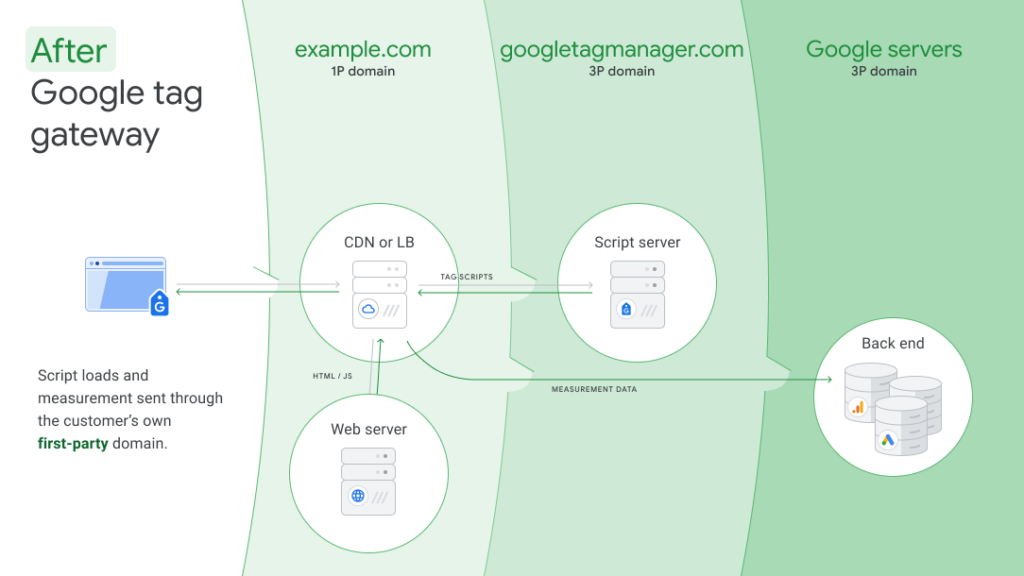
This matters because:
- First-party cookies persist longer. Browsers like Safari and Firefox aggressively limit third-party cookie lifespans (often to 7 days or less). First-party cookies set by your own domain aren’t subject to these restrictions.
- Fewer requests get blocked. Ad blockers and privacy extensions target known third-party tracking domains. When tags come from your own domain, they’re far less likely to be blocked.
- Page load impact is reduced. CDN-served tags benefit from edge caching and reduced latency.
Tag Gateway works with Google tags only: Google Analytics 4, Google Ads conversion tracking, Floodlight (CM360), and the Google Tag. It does not support non-Google platforms like Meta, TikTok, LinkedIn, or any other third-party tag.
The setup process involves configuring a subdomain on your CDN and pointing it to Google’s tag serving infrastructure. For most businesses, this can be completed in under an hour with a supported CDN provider.
When should you consider server-side tagging instead?
Server-side tagging is the right choice when you need multi-vendor tag support, granular data control, or you’re running significant ad spend across platforms beyond Google. It’s a fundamentally different architecture – instead of tags firing in the visitor’s browser, data is sent to a server container you control, which then forwards events to each platform.
Server-side makes sense when:
- You’re running ads across multiple platforms. If you need conversion tracking for Meta, TikTok, LinkedIn, Snapchat, or other non-Google platforms alongside Google, Tag Gateway won’t cover it. Server-side GTM can send data to all of them from a single endpoint.
- You need to control what data leaves your environment. Server-side tagging lets you inspect, transform, enrich, or strip data before it’s sent to any vendor. This is critical for businesses with strict data governance or privacy requirements.
- Your ad spend justifies the investment. At scale, even a small percentage improvement in signal accuracy translates into significant budget efficiency.
- You have (or can engage) technical resources. Server-side tagging requires a cloud server running a GTM container, ongoing monitoring, and maintenance. It’s not a set-and-forget solution.
The cost of server-side tagging varies. Google Cloud Run is the most common hosting option, with costs typically ranging from $50 to $500+ per month depending on traffic volume. Third-party hosting providers like Stape and Addingwell offer managed options at similar price points.
What signal improvement can you expect from Tag Gateway?
Google reports a median 11% improvement in conversion signal when using Tag Gateway, primarily from reduced ad blocker interference and improved cookie persistence in a first-party context.
In practice, the improvement varies. Businesses whose audiences use ad blockers heavily (common in tech-savvy B2B audiences) may see improvements well above 11%. Businesses targeting older demographics or less tech-literate audiences may see smaller gains.
The signal improvement matters most for:
- Google Ads Smart Bidding. Bidding algorithms rely on conversion data to optimise. More complete conversion data means better bidding decisions and more efficient spend.
- Performance Max campaigns. PMax is heavily reliant on conversion signals for audience targeting and creative optimisation.
- GA4 data completeness. Better signal means more accurate attribution, more complete user journeys, and more reliable reporting.
For businesses with significant Google Ads spend, an 11% improvement in conversion signal can materially change campaign performance and ROAS.
Can you use both Tag Gateway and server-side tagging together?
Yes, and for many businesses this is the ideal setup. The two approaches aren’t mutually exclusive – they solve different problems and complement each other well.
A common configuration:
- Tag Gateway for all Google tags – GA4, Google Ads, Floodlight, Google Tag. Simple, free, effective signal improvement.
- Server-side GTM for non-Google platforms – Meta CAPI, TikTok Events API, LinkedIn Conversions API. Full data control and multi-vendor support.
This “best of both worlds” approach gives you the simplicity and zero cost of Tag Gateway where it works (Google ecosystem) and the flexibility of server-side where you need it (everything else).
It also supports a progressive implementation path: start with Tag Gateway (quick win, minimal effort), then add server-side GTM as your needs grow or your ad spend across non-Google platforms increases.
How do you decide which approach is right for your business?
The right tracking setup depends on four factors: your ad spend level, which platforms you’re advertising on, your internal technical capability, and your data governance requirements.
Choose standard client-side tagging if:
- You’re in the early stages of digital advertising
- Your ad spend is modest and primarily on one platform
- You don’t have technical resources to manage infrastructure
Choose Google Tag Gateway if:
- You’re primarily running Google Ads, GA4, and/or CM360
- You want signal improvement without infrastructure investment
- You have limited internal development resources
- You want a quick win before investing in server-side
Choose server-side tagging (sGTM) if:
- You’re running significant ad spend across multiple platforms (Google + Meta + TikTok + others)
- Signal accuracy directly impacts your budget efficiency
- You have strong data governance or privacy compliance requirements
- You have an internal development team or an implementation partner
Choose both if:
- You have a complex ad tech stack spanning Google and non-Google platforms
- You want the simplicity of Gateway for Google alongside the control of sGTM for everything else
- You’re taking a progressive approach – Gateway now, sGTM later
Frequently asked questions
Is Google Tag Gateway free?
Yes. Tag Gateway itself is free. You need a CDN provider, and there are no per-request charges from Google. This is one of its biggest advantages over server-side tagging. We recommend leveraging a certified Google partner like XPON for Google Tag Gateway setup.
Does Tag Gateway replace Google Tag Manager?
No. Tag Gateway works alongside GTM (or gtag.js). It changes how tags are delivered to the browser (via your domain instead of Google’s), but the tag configuration and management still happens in GTM as normal.
What CDN providers support Google Tag Gateway?
Cloudflare, Akamai, Fastly, and Amazon CloudFront all support Tag Gateway. Cloudflare is the most common choice for businesses getting started, partly because of its free tier.
Will Tag Gateway work with Meta or TikTok tags?
No. Tag Gateway only supports Google tags (GA4, Google Ads, Floodlight, Google Tag). For non-Google platforms, you need server-side tagging or continue with standard client-side implementation.
How long does it take to set up Tag Gateway?
For most businesses with an existing CDN, configuration takes under an hour. If you need to set up a CDN from scratch (e.g., adding Cloudflare), allow half a day including DNS propagation.
Does Tag Gateway help with GDPR or privacy compliance?
Tag Gateway improves your first-party data collection posture, but it doesn’t replace the need for proper consent management. You still need consent mode implementation and a compliant cookie banner. The data still reaches Google’s servers – Gateway changes the delivery path, not the destination.
Can Tag Gateway improve Google Ads conversion tracking?
Yes. The median 11% signal improvement directly benefits Google Ads conversion tracking accuracy. More complete conversion data means better Smart Bidding performance and more accurate ROAS reporting.
Next steps
If you’re unsure which tracking approach fits your business, or you want to implement Tag Gateway or server-side tagging alongside your existing setup, our team can help.
As a Google Marketing Platform Partner and Google Cloud Partner, we implement both Tag Gateway and server-side GTM for businesses across Australia and New Zealand. We can assess your current tracking setup, identify signal gaps, and recommend the right path forward.
Talk to our team about your tracking setup