

Google Analytics 4 (GA4) has quietly undergone its most significant evolution since the Universal Analytics migration. In the first quarter of 2026, Google released a series of GA4 2026 features that signal something bigger than incremental product updates – a shift in what GA4 is designed to do.
We recently hosted a webinar breaking down these changes with Tim Lillyman (Head of Marketing) and Sumen (Head of Data & Analytics) at XPON.
Here are the key takeaways, what the features actually do, and what they mean for marketers.
Why did Google change GA4 in 2026?
With roughly 14-15 million websites now running GA4 as their primary analytics platform, adoption is no longer the challenge. Usage is. Only 38% of marketers have connected GA4 to their CRM or another data source (HubSpot 2025 State of Marketing), which suggests most businesses are still using GA4 as a basic reporting tool rather than an integrated part of their marketing stack.
The features released in early 2026 seem designed to close that gap – making GA4 easier to query, more flexible in how it attributes conversions, and for the first time, useful as a forward planning tool.
What is GA4 Analytics Advisor?
GA4 Analytics Advisor is an AI-powered assistant built on Google Gemini that lives directly inside GA4. It allows users to ask questions about their analytics data in natural language and receive answers with supporting charts and tables, without needing to navigate reports manually. It is now generally available across all GA4 properties.

How does Analytics Advisor work in practice?
In our live demo, we asked “What are the top traffic sources last month?” and received a summary table with session data by source, a daily trend chart, and follow-up question suggestions. When we spotted a traffic spike on a specific date, we asked a follow-up and the advisor drilled down to the specific campaign, device type, and geography responsible.
It also works as a configuration assistant. You can ask things like “How do I set up a custom audience?” and it provides step-by-step instructions with prerequisites, without needing to search through Google’s help documentation.
What are the current limitations of Analytics Advisor?
Analytics Advisor has several limitations to be aware of in its current beta state:
- Works with standard GA4 data only. It cannot yet query BigQuery exports or build custom funnels
- Accuracy is strong for basic queries but we’ve found some inconsistencies for complex, multi-dimensional investigations
- It lacks business context. It does not know whether your GA4 property is for a retail site, a publisher, or a SaaS platform, which affects how it interprets certain metrics
- Session history does not persist. Each time you close and reopen the assistant, it starts fresh
This is Google making GA4 more usable for the 56% who struggle to analyse their data. The barrier to getting insights drops significantly when you can just ask a question.
But there is an important caveat: the insights are only as good as your data foundations. If your tagging setup, data collection, and event configuration are not solid, Analytics Advisor will surface inaccurate answers faster than you could find them manually.
Our prediction: expect Google to extend this to BigQuery data and more complex query types in the near future.
What changed with GA4 attribution in 2026?
GA4 now supports per-conversion attribution settings, meaning you can configure different attribution models and lookback windows for each conversion type independently. Previously, all conversions shared the same attribution model and lookback window – a newsletter signup and a purchase were treated identically from an attribution perspective.
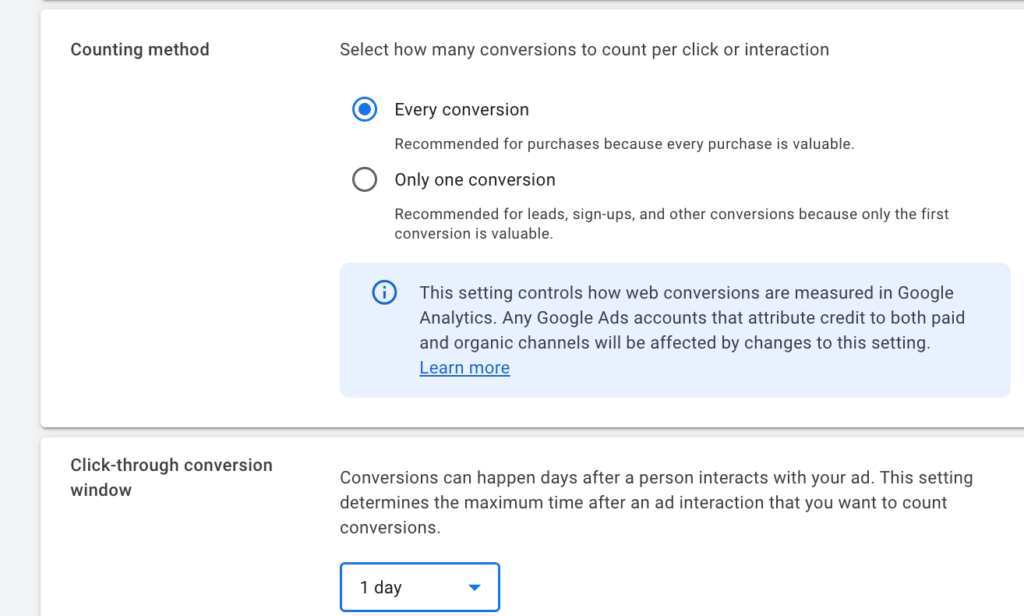
How do per-conversion attribution settings work?
You can now configure attribution settings independently for each conversion type:
| Setting | What you can customise | Example |
|---|---|---|
| Lookback window | Different windows per conversion | 30 days for newsletter signups, 90 days for purchases |
| Counting method | How conversions are counted | Once per session vs. every occurrence |
| Attribution model | Which model applies | Data-driven for high-volume events, last-click for simple actions |
You will find these settings in the Advertising section under Conversion Management. The interface now shows a side-by-side comparison of how conversions are configured in GA4 versus Google Ads, making it easy to identify and resolve discrepancies between the two platforms.
What is the new GA4 Conversion Attribution Analysis report?
Alongside the settings changes, Google has added a Conversion Attribution Analysis report designed to address the long-standing last-click bias problem. The report surfaces channels that contributed to conversions but did not receive the final click, giving marketers data to defend spend on awareness channels.
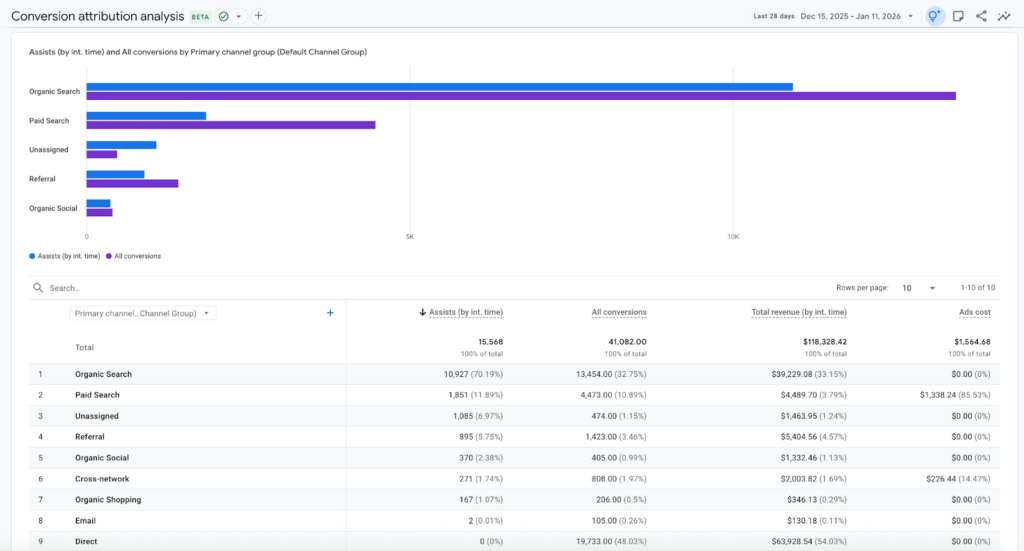
The report includes:
- Assisted conversions view: Shows channels that did not get the final click but were essential in the journey. This is the data that helps you justify investment in awareness channels like video and display
- Funnel position analysis: Categorises touchpoints into introducer, supporter, and closer roles so you can see which campaigns open doors versus which close deals
- Time toggle: Switch between conversion time (for historical analysis) and interaction time (for assessing recent campaign impact, aligned with Google Ads reporting logic)
What should you watch out for with these attribution changes?
There are several caveats to keep in mind:
- This report relies on GA4’s data-driven attribution model. If your property does not have enough conversion volume for the machine learning model to work effectively, you will see simplified data
- Some settings like counting method may still be locked for editing within Google Ads once shared from GA4
- Settings are property-specific. If you work across multiple GA4 properties, you need to configure each one independently
What is GA4 cross-channel budgeting?
GA4 cross-channel budgeting is a new planning tool that lets marketers run budget scenarios across their entire paid media mix – including non-Google platforms – and see predicted impact on conversions and revenue. This is, in our view, the most significant GA4 2026 feature release, not just for what it does, but for what it signals about the future direction of the platform.
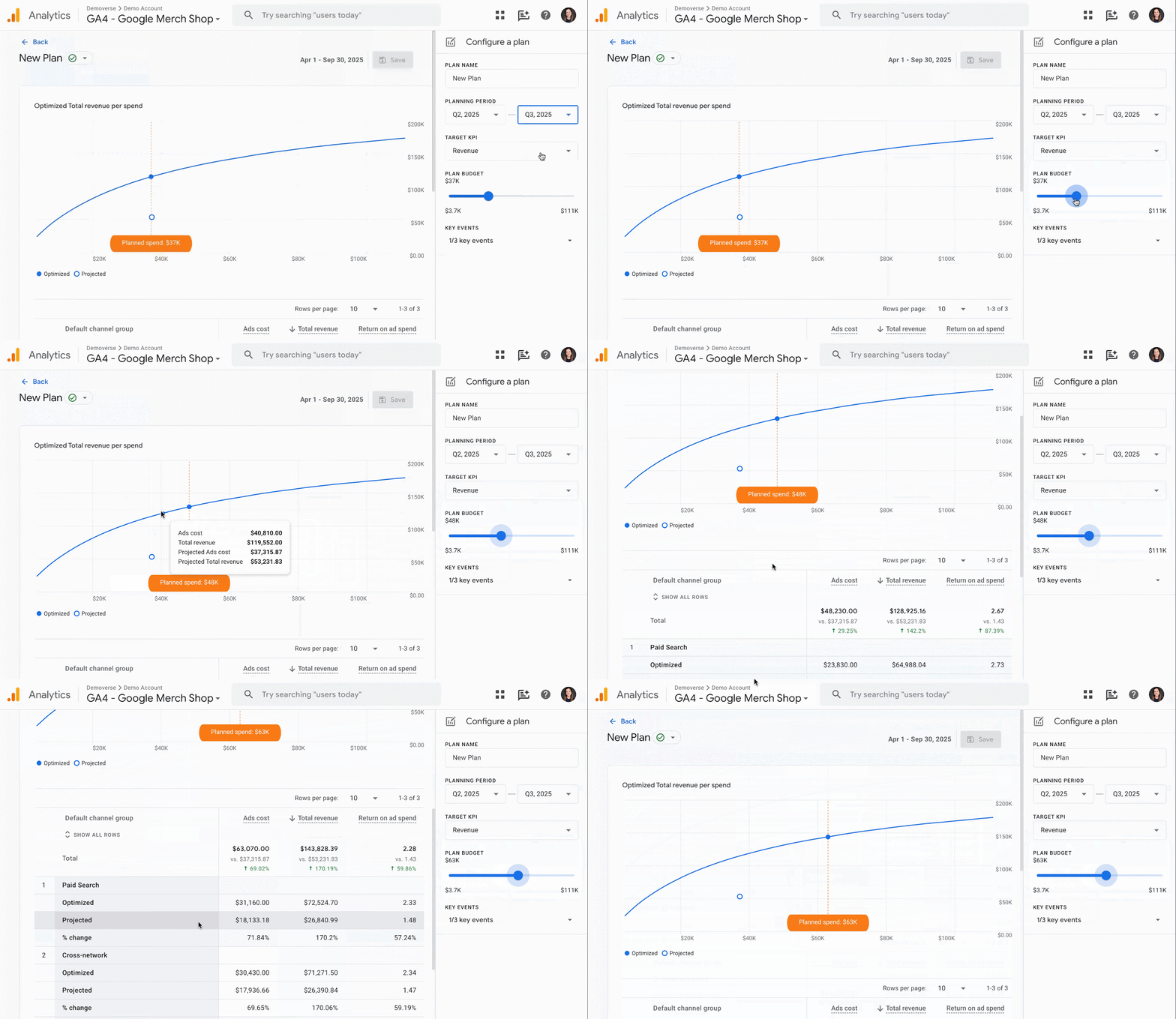
How does cross-channel budgeting work?
The tool lets you:
- View budget projections based on the last 12 months of historical data
- Run scenario plans by adjusting budget allocation across channels and seeing predicted impact on conversions and revenue
- Set target conversions and see whether current spend is on track to deliver
Which non-Google platforms can you integrate?
The feature that makes this genuinely useful: GA4 now supports direct integrations with non-Google advertising platforms. You can import historical performance and spend data from:
- Meta (Facebook/Instagram)
- TikTok
- Snapchat
- Manual imports for any other platform
This means cross-channel budgeting in GA4 is not limited to Google Ads. You can model budget scenarios across your entire paid media mix from within the platform.
Why is this a mindset shift for GA4?
GA4 has historically been a retrospective reporting tool. You look at what happened, analyse it, and make decisions based on past performance.
Cross-channel budgeting flips this. It introduces forward-facing planning directly into the analytics platform. You are no longer just asking “what happened?” but “what should we do next, and what will happen if we do?”
This is a fundamentally different use case for GA4. It moves the platform closer to being a planning and decision-making tool, not just a measurement one.
What are the limitations of GA4 budgeting?
Set expectations appropriately before relying on this tool:
- Accuracy depends entirely on your historical data. You need at least 12 months of conversion data for reliable projections
- If your non-Google cost data is incomplete or inconsistent, projections will be less reliable
- This is a planning tool, not a guarantee. Use it to inform strategy and get buy-in from budget holders, then cross-reference with actual marketing attribution performance as campaigns run
What should marketers do next?
These three features collectively point to a clear product direction: Google is responding to the adoption challenges that emerged after the UA migration and expanding what GA4 can do for marketers who are not deep technical users. Here are three practical actions to take.
1. Audit your data foundations now. Every new feature – from AI insights to budget projections – depends on accurate data collection. If your tagging, event configuration, and conversion setup are not clean, these tools will give you fast but wrong answers. This is the single highest-ROI action you can take.
2. Rethink how you use GA4. If you have been treating it purely as a “what happened last month” tool, the cross-channel budgeting feature is an invitation to use it for forward planning. Start connecting your non-Google ad platforms and exploring budget scenarios.
3. Test the new features while they are in beta. Analytics Advisor and cross-channel budgeting are still in beta. Google is actively soliciting feedback, which means the product team is listening. Get in early, find the gaps, and submit feedback. The features will improve faster with active users shaping them.
Frequently asked questions
Are GA4’s AI-generated insights actually accurate?
We have tested Analytics Advisor across multiple GA4 properties. For basic queries such as traffic sources, session counts, and campaign performance, the answers have been accurate every time we have cross-referenced against the standard reports. For more complex investigations involving multiple dimensions and custom metrics, there are occasional inconsistencies. For example, the advisor initially interpreted “last month” as the last 28 days rather than the calendar month. Our assessment: reliable for everyday questions, but verify anything complex against your reports before acting on it.
Does GA4 give more credit to Google Ads because it is a Google platform?
The data-driven attribution model within GA4 is somewhat of a black box. We cannot see exactly how credit is distributed under the hood, so we cannot definitively confirm or deny platform bias. Privacy regulations (GDPR, iOS App Tracking Transparency) and signal loss affect all measurement platforms, not just GA4. For clients where attribution confidence is critical, we recommend running independent attribution models alongside GA4 reporting.
Are these new GA4 features available to everyone?
Analytics Advisor is now in Beta but should be accessible across most GA4 properties. The attribution settings changes and cross-channel budgeting are currently in beta and being progressively rolled out. Check your GA4 Advertising section to see if the features are active in your property.
Do you need GA4 360 to access cross-channel budgeting?
The cross-channel budgeting feature is available in the Advertising section of standard GA4 properties. You do not need a GA4 360 licence, though the accuracy of projections depends on having sufficient historical conversion data.
How do the new attribution settings affect existing Google Ads campaigns?
When you change attribution settings within GA4 for a specific conversion, the GA4 interface will flag any discrepancies between your GA4 and Google Ads configurations. Some settings like counting method may still be locked for editing within Google Ads once shared from GA4, so plan configuration changes carefully.
What is the minimum data needed for GA4 cross-channel budgeting to work?
Google recommends at least 12 months of historical conversion data for reliable projections. If your non-Google cost data (from Meta, LinkedIn, TikTok, etc.) is incomplete or inconsistent, the projections for those channels will be less reliable. Ensure all platform integrations are in place and importing data consistently before relying on budget projections.
Need help with your GA4 setup?
If these features have highlighted gaps in your measurement setup, or you want to make sure your data foundations are solid before adopting the new tools, we offer complimentary measurement strategy sessions.
These are genuine working sessions (not sales pitches) where we review your current analytics setup, identify quick wins, and map out a path to getting more value from your data. As a Google Marketing Platform Partner, we work with GA4 daily across dozens of client properties.
Book a complimentary measurement strategy session